
Working Modes XXODD APP
Smart Mode
Smart Mode combines:
- Forecasted solar production
- Forecasted household consumption
- Dynamic electricity tariffs
- Battery charge/discharge behavior
It generates a cost-optimal schedule for each day, tailored to the household’s expected energy flow. The schedule is adjusted continuously during the day to match the latest actual data and updated forecasts.
Requirements
- Solar Forecasts need to be set up: PV system forecast configuration (kWp, orientation, tilt can be set in inverter settings under devices)
- Electricity tariff data: enter your electricity tariff information (from the home screen or from settings). This is needed such that Autopilot can make cost-optimal decisions.
Enabling Smart Mode
- Configure PV system forecast settings in the app.
- Configure your electricity price settings.
- Go to the device settings and enable Autopilot with Smart.
- Adjust the device-specific Smart Mode parameters.
Solar Mode
Solar Mode activates devices when solar production exceeds household consumption or when a user-defined solar generation threshold is reached (if no meter is available). It follows a priority order and ensures devices only run when there’s sufficient solar energy.
Enabling Solar Mode
- Go to the device settings and enable Autopilot with Solar.
- Set device priority, activation pwer threshold and minimum runtime.
Device Settings per Mode
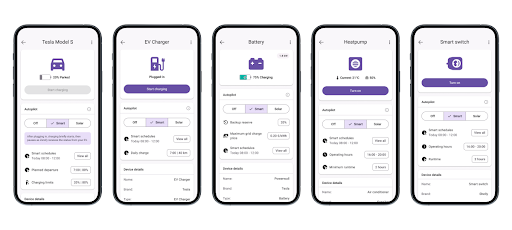
Smart Mode Settings
| Device Type | Configurable Parameters |
|---|---|
| EV (via API) | – SoC target (%) – Departure time – Max/Min charge limits (%) |
| EV Charger | – Daily driving distance (km or kWh equivalent) |
| Smart Switch | – Daily runtime (min) – Allowed operating hours (e.g., 09:00–17:00) |
| HVAC Devices | – Allowed operating hours – Optional: runtime limit (e.g., max 2h/day) |
| Battery | – Minimum charge level the battery is charged to before activating any other devices from solar excess |
Solar Mode Settings
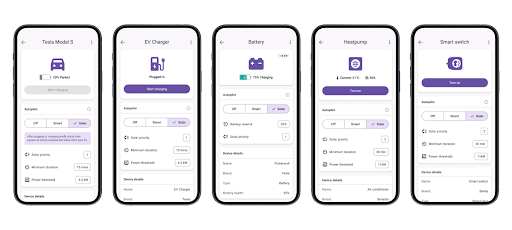
| Device Type | Configurable Parameters |
|---|---|
| All devices | – Priority (relative order in which devices are triggered when solar surplus is available) – Minimum runtime (to avoid short activations) |
Device Behavior by Type
EVs (with API access)
- Smart Mode: Charges to reach the configured SoC before departure time, using cheapest forecasted hours.
- Solar Mode: Charges when excess solar is available, respecting priority and minimum runtime.
EV Chargers (non-API)
- Smart Mode: Charges a daily target (converted from distance) during low-cost or high-solar hours.
- Solar Mode: Activates charging during sufficient solar surplus, subject to configured thresholds.
Smart Switches
- Smart Mode: Operates for a configured number of minutes within allowed operating hours.
- Solar Mode: Activates based on solar surplus, respecting priority and minimum runtime.
HVAC Devices
- Smart Mode: Operates within user-defined hours, optimized for cost and solar availability.
- Solar Mode: Triggers during high solar production, if configured.
Batteries
- Smart Mode: Optimized for cost arbitrage — charges when cheap, discharges when expensive.
- Solar Mode: Charges during solar surplus, discharges during high usage or export.